![Transmural Platform [TMP]](https://www.telemonitoring-prescription.com/wp-content/uploads/2024/07/logo-tmprescription.png)
Give healthcare professionals single-sign-on access to your dashboards, directly from the Transmural Platform Portal.
What’s New?
The Transmural Platform Portal already supports embedding patient-specific dashboards provided by Transmural Care Data Providers. With this new feature, we’re extending that capability to overview dashboards. These are the dashboards that give an HCP a broader view across patients or programmes, rather than a single telemonitoring session.
When an HCP opens the Dashboards tab in the Portal, they’ll see the providers that support this feature listed with an Open Dashboard button. One click, and they’re redirected to your authenticated dashboard, no separate login required. TMP takes care of identifying and authenticating the healthcare professional on your behalf.
Why It Matters
For healthcare professionals, this means fewer logins, fewer tabs, and faster access to the insights your platform provides. For you as a Transmural Care Data Provider, it means your dashboards become more visible and more accessible to the clinicians who rely on your data every day.
By removing the authentication friction, you can expect higher engagement with your dashboards and a smoother workflow for the care teams using your solution.
How It Works
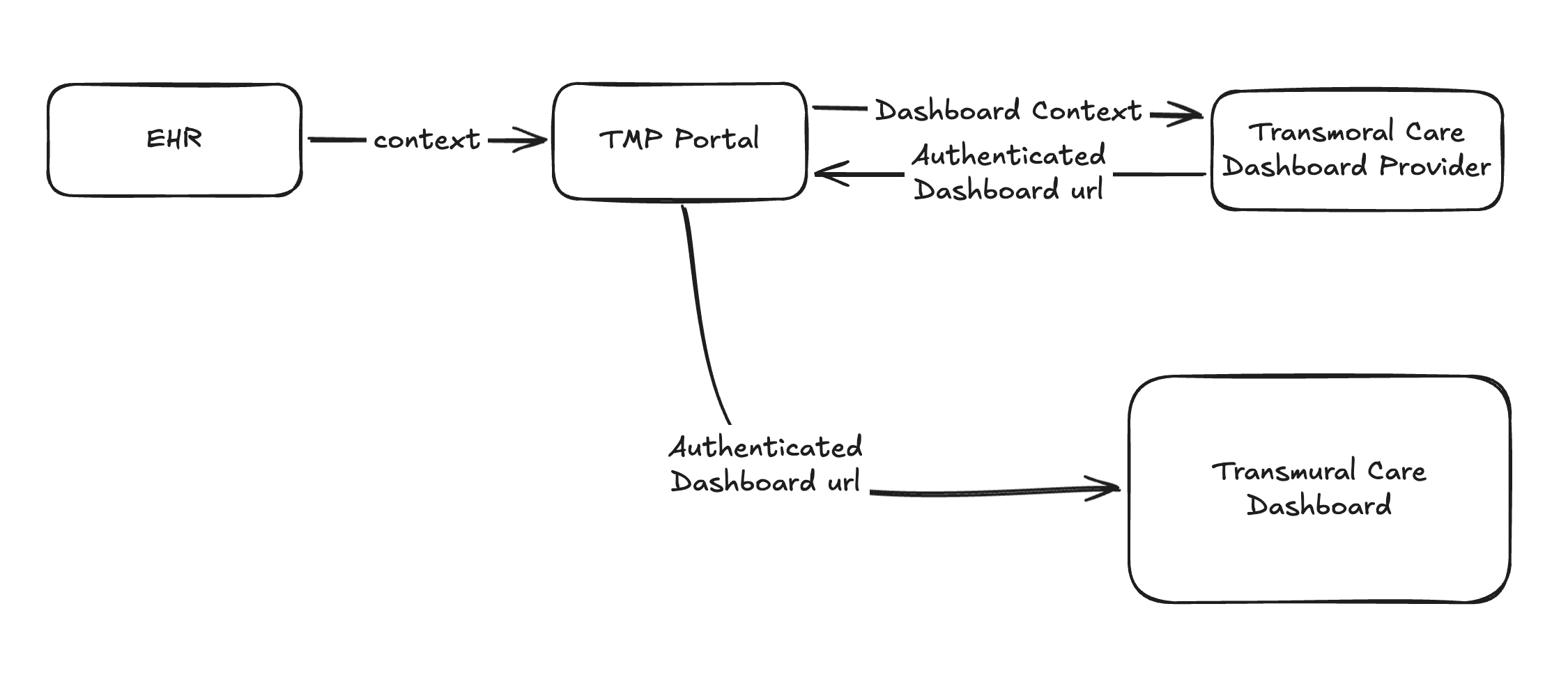
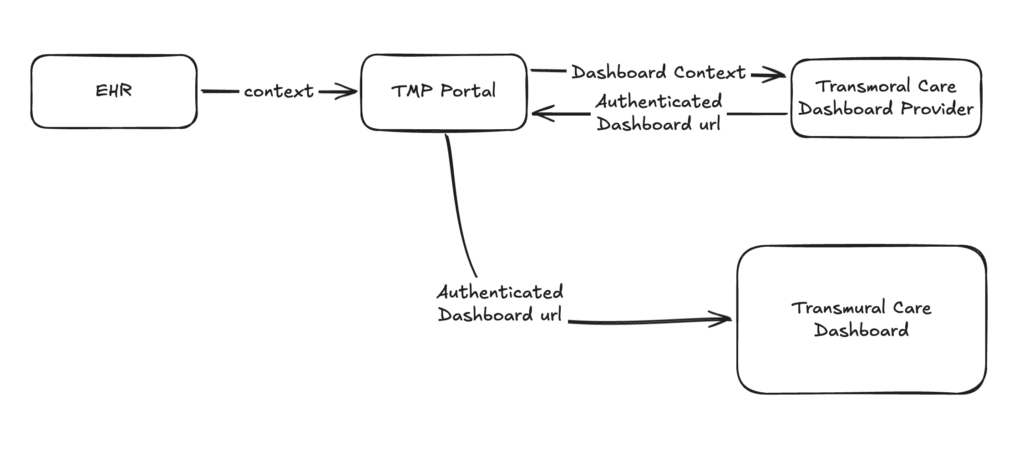
The integration is straightforward. When an HCP clicks the Open Dashboard button in the TMP Portal, TMP makes a POST request to an endpoint you define. That request includes the relevant context: the Prescriber ID and, when available, the responsible and prescribing HCP identifiers. Your endpoint returns an authenticated URL, and TMP redirects the HCP to that URL.
In short, you provide the endpoint and handle the URL generation with authentication; TMP handles the trigger and the redirect.
The full technical specification of the API call TMP makes to your endpoint is documented in the OpenAPI specifications.
What You Need to Implement
To enable this feature, you’ll need to expose a single endpoint on your side that TMP can call. This endpoint should accept a POST request containing prescriber and HCP context, generate an authenticated dashboard URL for that user, and return that URL in the response so TMP can redirect the HCP.
The authentication logic is entirely in your hands, whether you use signed URLs, short-lived tokens, or any other mechanism that fits your security model. The key requirement is that the returned URL grants the HCP immediate, authenticated access to your dashboard without requiring a separate login.
Getting Started
If you’re already integrated as a Transmural Care Data Provider, enabling the Dashboard feature is as simple as implementing the endpoint and letting us know it’s ready. We’ll configure it on our side and you’ll be live.
If you’re not yet integrated with the Transmural Platform, this is a great time to get started. The full integration guide, covering request context, results, patient authentication, and now dashboards, is available on our Data Provider Integration page.
To get set up or to enable the Dashboard integration for your existing provider profile, reach out to us at support@transmuralplatform.eu. We’ll configure a test environment where you can validate the full flow before going live in production.
Leave a Reply