![Transmural Platform [TMP]](https://www.telemonitoring-prescription.com/wp-content/uploads/2024/07/logo-tmprescription.png)
For EHRs
To make it easy for the Healthcare Professional (HCP) to prescribe Telemonitoring from within the Electronic Health Record (EHR), we provide the possibility for all EHR Systems to integrate the Telemonitoring Portal.
To lower the needed efforts for the EHR provider as much as possible and because customizability is mostly limited we value a close cooperation with EHR providers and will make specific EHR adapters when necessary.
Integration
Documentation
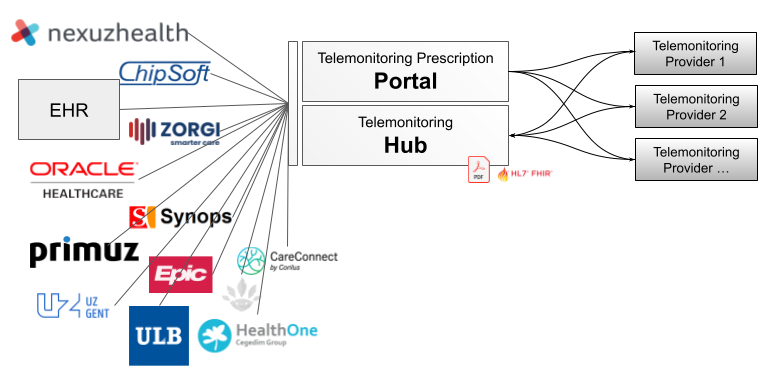
This chapter explains how a secure transmission of context is achieved between the Prescriber (ex: EHR) and the Telemonitoring Portal.
Note that we offer a default integration, which is often possible to integrate out-of-the-box with EHR systems. However if the EHR prefers a different connection, we are happy to adapt to their preference.
The Patient Dashboard of the Prescriber requires a button (or link) where the HCP can request a Telemonitoring Prescription. When the HCP wants to start a session there are several steps that need to be taken
Step 1 : Authentication
Each Prescribing instance has a unique clientId and clientSecret, to request one, please reach out to support@telemonitoring-prescription.com.
The first step in the process is to request an access_token from the /auth call, the OpenAPI specifications for this call can be found here.
Step 2 : Sent the context towards the Transmural Platform
With the access_token from the /auth call, the next step is the context (patient information, prescribing HCP, …) towards the Transmural Platform. Sending the context happens via the /request call for which the OpenAPI specifications can be found here.
Step 3 : Display the URI within your EHR
This URL is HMAC (Hash-Bashed Message Authenticated Code) protected with an expiry of 1 hour. This means that the url which is returned by the Telemonitoring Prescription Portal can only be used for 1 hour to prescribe a Transmural Care Data Provider. Afterwards a new prescription need to be triggered.
Supported Actions
When prescribing a Transmural Care Data Provider Service you’ll be informed what supported actions are available for that Transmural Care Data Provider. In case a supported action is triggered on the Telemonitoring Prescription Portal, it will inform the Transmural Care Data Provider. It is up to the Provider to process the action accordingly.
Stop
When this action is available you’re able to stop the Telemonitoring Session. This could be useful when you’re being charged differently if a session is in-progress versus a session is stopped. Telemonitoring Prescription only allows the stop-action to be triggered on a Telemonitoring Session in status: “accepted” or “in-progress”.
API Documentation can be found here.
Cancel
The cancel action could be made when a prescription was made mistakenly and you want to undo the prescription. Telemonitoring Prescription only allows the cancel-action to be triggered on a Telemonitoring Session in status: “requested” or “accepted”.
API Documentation can be found here.
Note : This might not be possible when measurements have already been linked to the session. In that case you’ll have to stop the current one and start a new one.
Prescriptions for a Patient
To know which prescriptions have been created already for a specific patient the following API can be used. This API will only return prescriptions for the authenticated prescriber.
API Documentation can be found here.
Outcome Integration
When the Transmural Platform receives an update for a session from a Transmural Care Data Provider, TMP will inform the EHR system about it through an API call. The details of the API call the Transmural Platform makes to the Endpoint of the EHR can be found here.
A single Prescriber account can have zero or more Webhooks configured to send the data received from the Transmural Care Data Provider to. Each webhook can be configured to only allow messages from a particular Carepath to be send towards the webhook. Next to the filtering on carepath there is also the possibility to enable security on the webhook.
The Transmural Platform currently supports the following security implementations on the API call towards the EHR system:
- mTLS
- Service Account
- Authorization Header
- None
Asset Proxy
The Provider’s attachments are hosted on the Provider’s own system. As a result, hospitals or EHR systems may need to allow outbound access to those endpoints through their firewall. If that isn’t feasible, TMP offers a Proxy solution.
When the Proxy is enabled, each attachment URL pointing to the Provider is replaced with a unique TMP URL. Accessing this URL transparently proxies the request to the Provider-hosted attachment.
The Proxy URL is protected via the Authorization header, consistent with other TMP API calls.
If you want to enable the Proxy functionality for your account, please reach out to support@telemonitoring-prescription.com.
Asset Storage Links
The EHR system can also verify if the received attachment is from a trusted source. To do so, the TransmuralPlatform allows a Transmural Care Data Provider to fill out the different sources where attachments can be stored on their platform. The Transmural Platform shares this information (for all the Transmural Care Data Providers with the EHR systems so they can verify if the received attachment link is from a trusted source.
More information on the endpoint to fetch the list of trusted storage links can be found here.
Additional Notes
This list of whitelisted URLs may be updated over time as new asset storage locations are added or old ones are removed by providers.
Testing
For testing purposes of both the Context Integration and the Outcome Integration, we have foreseen a Dummy Transmural Care Data Provider. This can be enabled on request through support@telemonitoring-prescription.com.
The Dummy Transmural Care Data Provider will automatically accept the Telemonitoring Prescription Request after 1 minute. After accepting the request, the Dummy Transmural Care Data Provider will send a dummy WEIGHT measurement every 5 minutes and this for 24 hours. After 24 hours, the Dummy Transmural Care Data Provider will mark the request as completed.
| Status | Timing |
| accepted | After 1 minute |
| in-progress | After 5 minutes with FHIR attachment of WEIGHT measurement Repeated every 5 minutes for 24h |
| completed | After 24h |